Online shopping has never been easier — or more expensive, if you’re not paying attention. Between subscription creep, “limited time” sales that run every week, and delivery fees that quietly double your basket total, it’s easy to overspend without noticing. The good news is that saving money online isn’t about being tight-fisted. It’s about knowing a handful of systems and using them consistently.
This guide pulls together everything you need: how discount codes actually work, how cashback apps make money (and how you keep more of it), how to spot a fake deal before it costs you, and the habits that separate people who save hundreds a year from people who just mean to.
Why Most People Overpay Online
Retailers rely on a simple psychological pattern: urgency plus friction. A countdown timer creates urgency. A checkout process that doesn’t prompt you to look for a code creates friction — most shoppers simply forget to check. Studies on UK online shopping behaviour consistently show that a large share of shoppers abandon their basket specifically to search for a discount code, then either give up or forget to come back.
The fix isn’t complicated: build the habit of checking two or three trusted sources before you open your wallet, every single time. That’s it. The rest of this guide is about doing that efficiently.
Step 1: Discount Codes — Getting Them Right
A discount code (or voucher code) is a string of letters and numbers that unlocks a specific offer at checkout — a percentage off, free delivery, or money off above a minimum spend. They’re usually issued directly by the retailer for marketing purposes, which means they’re free to use and carry no risk to you as a shopper.
Where to actually find working codes:
- The retailer’s own newsletter (often the freshest codes, since they’re first-party)
- Established voucher code sites that list expiry dates clearly
- Browser extensions that auto-apply codes at checkout, so you don’t have to hunt manually
- Student or NHS discount schemes if you’re eligible — these often stack with general offers
Common mistakes that waste people’s time:
- Using codes from unverified social media posts, which are frequently expired or fake
- Not checking the minimum spend requirement before adding items to match it
- Forgetting that codes are usually single-use per account, not per order
- Missing that some codes exclude sale items entirely
If you want a deeper breakdown of how to tell a genuine code from a fake one, see our dedicated guide on spotting fake discount codes.
Step 2: Cashback — Getting Paid to Shop You Were Already Doing
Cashback works differently from a discount code. Instead of reducing the price at checkout, a cashback platform tracks your purchase through an affiliate link and pays you back a percentage afterwards — usually a few weeks later, once the retailer confirms the sale wasn’t returned.
This matters because it changes your strategy: cashback is best for purchases you were already planning to make, not an excuse to buy more. The golden rule is simple — never buy something because there’s cashback on it. Buy it because you need it, and treat the cashback as a bonus.
A few things worth knowing before you rely on cashback:
- Tracking can fail if you use an ad blocker or have cookies disabled — always check the retailer page loaded correctly before buying
- Rates change frequently, sometimes daily, so check the rate at the moment of purchase, not from memory
- Payouts are rarely instant. Most platforms hold cashback as “pending” for 30–90 days before it’s confirmed and payable
- Combining a discount code with cashback usually works, but not always — some retailers exclude sale-price purchases from cashback tracking
Step 3: Comparing Before You Buy
This is the step most people skip, and it’s the one that saves the most money. A 20% discount code on an overpriced item is still a bad deal. Before applying any code, take thirty seconds to check the price elsewhere — a quick search, a price history tool, or comparing two or three retailers directly.
A simple three-question check before any purchase over £30:
- Has this item been cheaper recently? (Price history tools can show this in seconds)
- Is a competitor selling the identical item for less right now?
- Am I buying this because I need it, or because the deal makes it feel urgent?
If the answer to the third question is “the deal,” it’s worth sitting on the purchase for 24 hours. Genuine good deals are rarely gone in a day; manufactured urgency almost always is.
Step 4: Building the Habit Without the Stress
Saving money online shouldn’t feel like a second job. The households that save the most consistently tend to do three simple things, not twenty complicated ones:
- Keep one place for codes and cashback rates — a bookmarked folder or browser extension, rather than searching fresh every time
- Set a personal rule for “cooling off” on non-essential purchases — even 24 hours reduces impulse spending significantly
- Review subscriptions and recurring payments every few months — this tends to save more than any single discount code ever will, because it stops ongoing leakage rather than one-off spend
None of this requires spreadsheets or extreme budgeting. It requires consistency more than intensity.
Putting It Together
Here’s the realistic version of “saving money online” that actually works long-term:
- Never check out without spending thirty seconds looking for a valid code
- Use cashback on purchases you’d make anyway, and treat it as a bonus, not a reason to buy
- Compare prices before trusting any “discount,” since the discount is only real relative to a fair starting price
- Build small, repeatable habits rather than relying on willpower during sales events
None of these steps take long individually, but together they add up to hundreds of pounds a year for the average UK household — without changing what you buy, only how carefully you buy it.
Looking for savings on a specific retailer? Browse our up-to-date discount code and voucher guides, or check out our cashback and fintech app reviews for ways to earn while you spend.
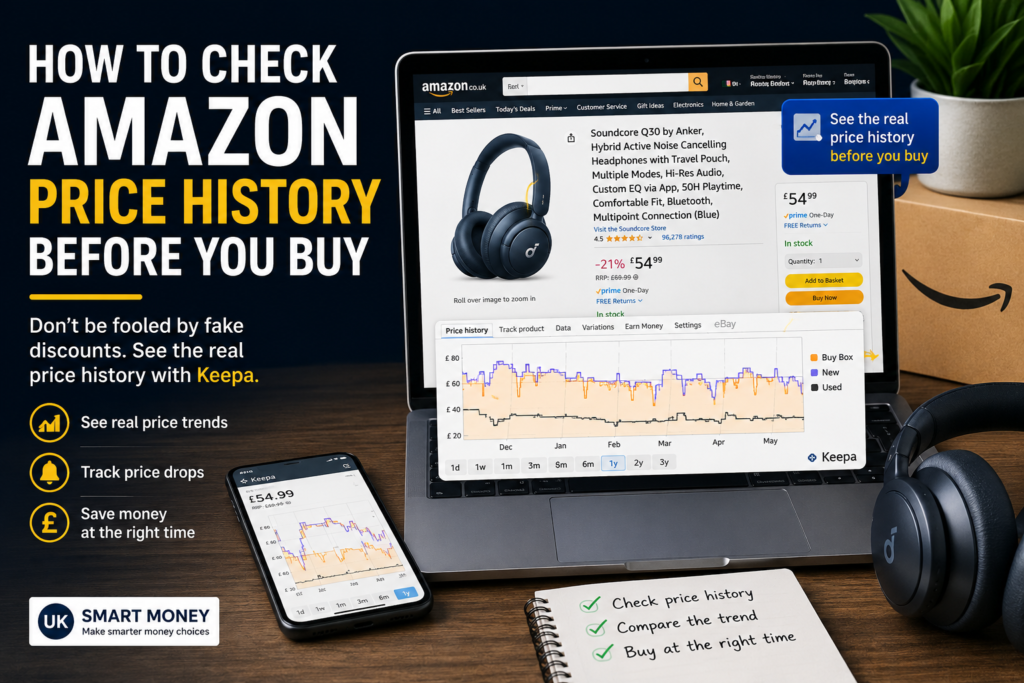
 Keepa price history for the Anker Soundcore Q30, showing the current Buy Box price, 180-day average and one-year low.
Keepa price history for Anker Soundcore Q30 showing £54.99 current price, £52.57 180-day average and £40.84 one-year low.”
Example: A “£30 Saving” That Isn’t Really £30
Imagine Amazon shows:
Was £79.99
Now £49.99
Save £30
That sounds impressive.
But suppose the price history shows something like this:
– £49.99 for most of January
– £54.99 in February
– £49.99 in March
– £59.99 in April
– £49.99 today
Suddenly, the £30 saving doesn’t look quite as exciting.
You’re not necessarily getting a bad price. You’re simply not getting the spectacular bargain the discount label might suggest.
That’s why checking historical pricing is so useful.
A Better Question to Ask
Instead of asking:
“How much money am I saving?”
ask:
“Is this one of the better prices this product has been sold for?”
That’s a much better way to think about Amazon deals.
The difference is subtle but important.
A £20 discount isn’t automatically a good deal. A product costing £20 less than its previous price can still be poor value if the product itself isn’t worth £20.
Check the Current Amazon Price
If you’ve checked the price history and you’re happy with the deal, you can check the latest Amazon UK price before buying.
“CHECK THE ANKER SOUNDCORE Q30 ON AMAZON UK” (https://amzn.to/4ql6VEV)
Remember that Amazon prices can change at any time, so always check the current price on the product page before purchasing.
Don’t Make This Mistake With Amazon Price History
There is one important limitation: price history does not tell you whether a product is good.
It only helps you understand the price.
A product can be at its lowest historical price and still be a bad purchase.
Before buying, you should also consider:
– Customer reviews
– Review quality rather than just the star rating
– Product specifications
– Seller reputation
– Warranty
– Return policy
– Whether you actually need the product
Price history should be one part of your decision, not the entire decision.
Keepa Can Also Alert You When the Price Drops
One of the most useful features of Keepa is price-drop tracking.
Instead of repeatedly checking Amazon yourself, you can set up an alert for a product you’re interested in.
For example, you might decide:
“I’ll buy this if it drops below £40.”
Rather than paying £49.99 today, you can wait and let the price tracker notify you if the price reaches your target.
This can be particularly useful for more expensive products where waiting for a price drop could save you a meaningful amount of money.
Keepa Isn’t the Only Option
Keepa is not the only tool available for checking Amazon prices.
Two alternatives worth knowing about are:
CamelCamelCamel
A free Amazon price tracker that provides price-history charts and price-drop alerts.
Honey
A shopping browser extension that can track prices and provide shopping-related features across supported retailers.
Keepa remains one of the more detailed options for analysing Amazon price history, but it’s worth knowing that you have alternatives.
Should You Bother Checking Price History?
If you regularly shop on Amazon, it’s worth building into your routine.
You don’t have to check the price history of every £5 purchase.
But for more expensive products — TVs, laptops, phones, power tools, kitchen appliances, headphones, cameras and smart home equipment — checking the historical price takes only a minute and could prevent you from buying at the wrong time.
Before purchasing an expensive item, use this quick process:
1. Find the product.
2. Check the current price.
3. Check the historical price.
4. Compare today’s price with the normal range.
5. Check whether it has recently been cheaper.
6. Decide whether you actually need it.
7. Only then decide whether to buy.
Final Verdict
Amazon’s discount percentage can be useful, but it shouldn’t be the only thing you look at.
A product saying “Save 40%” doesn’t automatically mean you’re getting a 40% bargain.
Checking the price history gives you a much better idea of what the product normally costs and whether today’s price is genuinely attractive.
Next time you see an Amazon “deal”, don’t immediately reach for your wallet.
Check the history first.
Disclosure
Some links on UK Smart Money may be affiliate links. If you purchase something through one of these links, we may receive a commission at no additional cost to you.
We only recommend tools and services that we believe can be useful to our readers.
Keepa price history for the Anker Soundcore Q30, showing the current Buy Box price, 180-day average and one-year low.
Keepa price history for Anker Soundcore Q30 showing £54.99 current price, £52.57 180-day average and £40.84 one-year low.”
Example: A “£30 Saving” That Isn’t Really £30
Imagine Amazon shows:
Was £79.99
Now £49.99
Save £30
That sounds impressive.
But suppose the price history shows something like this:
– £49.99 for most of January
– £54.99 in February
– £49.99 in March
– £59.99 in April
– £49.99 today
Suddenly, the £30 saving doesn’t look quite as exciting.
You’re not necessarily getting a bad price. You’re simply not getting the spectacular bargain the discount label might suggest.
That’s why checking historical pricing is so useful.
A Better Question to Ask
Instead of asking:
“How much money am I saving?”
ask:
“Is this one of the better prices this product has been sold for?”
That’s a much better way to think about Amazon deals.
The difference is subtle but important.
A £20 discount isn’t automatically a good deal. A product costing £20 less than its previous price can still be poor value if the product itself isn’t worth £20.
Check the Current Amazon Price
If you’ve checked the price history and you’re happy with the deal, you can check the latest Amazon UK price before buying.
“CHECK THE ANKER SOUNDCORE Q30 ON AMAZON UK” (https://amzn.to/4ql6VEV)
Remember that Amazon prices can change at any time, so always check the current price on the product page before purchasing.
Don’t Make This Mistake With Amazon Price History
There is one important limitation: price history does not tell you whether a product is good.
It only helps you understand the price.
A product can be at its lowest historical price and still be a bad purchase.
Before buying, you should also consider:
– Customer reviews
– Review quality rather than just the star rating
– Product specifications
– Seller reputation
– Warranty
– Return policy
– Whether you actually need the product
Price history should be one part of your decision, not the entire decision.
Keepa Can Also Alert You When the Price Drops
One of the most useful features of Keepa is price-drop tracking.
Instead of repeatedly checking Amazon yourself, you can set up an alert for a product you’re interested in.
For example, you might decide:
“I’ll buy this if it drops below £40.”
Rather than paying £49.99 today, you can wait and let the price tracker notify you if the price reaches your target.
This can be particularly useful for more expensive products where waiting for a price drop could save you a meaningful amount of money.
Keepa Isn’t the Only Option
Keepa is not the only tool available for checking Amazon prices.
Two alternatives worth knowing about are:
CamelCamelCamel
A free Amazon price tracker that provides price-history charts and price-drop alerts.
Honey
A shopping browser extension that can track prices and provide shopping-related features across supported retailers.
Keepa remains one of the more detailed options for analysing Amazon price history, but it’s worth knowing that you have alternatives.
Should You Bother Checking Price History?
If you regularly shop on Amazon, it’s worth building into your routine.
You don’t have to check the price history of every £5 purchase.
But for more expensive products — TVs, laptops, phones, power tools, kitchen appliances, headphones, cameras and smart home equipment — checking the historical price takes only a minute and could prevent you from buying at the wrong time.
Before purchasing an expensive item, use this quick process:
1. Find the product.
2. Check the current price.
3. Check the historical price.
4. Compare today’s price with the normal range.
5. Check whether it has recently been cheaper.
6. Decide whether you actually need it.
7. Only then decide whether to buy.
Final Verdict
Amazon’s discount percentage can be useful, but it shouldn’t be the only thing you look at.
A product saying “Save 40%” doesn’t automatically mean you’re getting a 40% bargain.
Checking the price history gives you a much better idea of what the product normally costs and whether today’s price is genuinely attractive.
Next time you see an Amazon “deal”, don’t immediately reach for your wallet.
Check the history first.
Disclosure
Some links on UK Smart Money may be affiliate links. If you purchase something through one of these links, we may receive a commission at no additional cost to you.
We only recommend tools and services that we believe can be useful to our readers.